
DoritoY
Run unlimited Instagram accounts on one regular iPhone, with nothing to jailbreak.

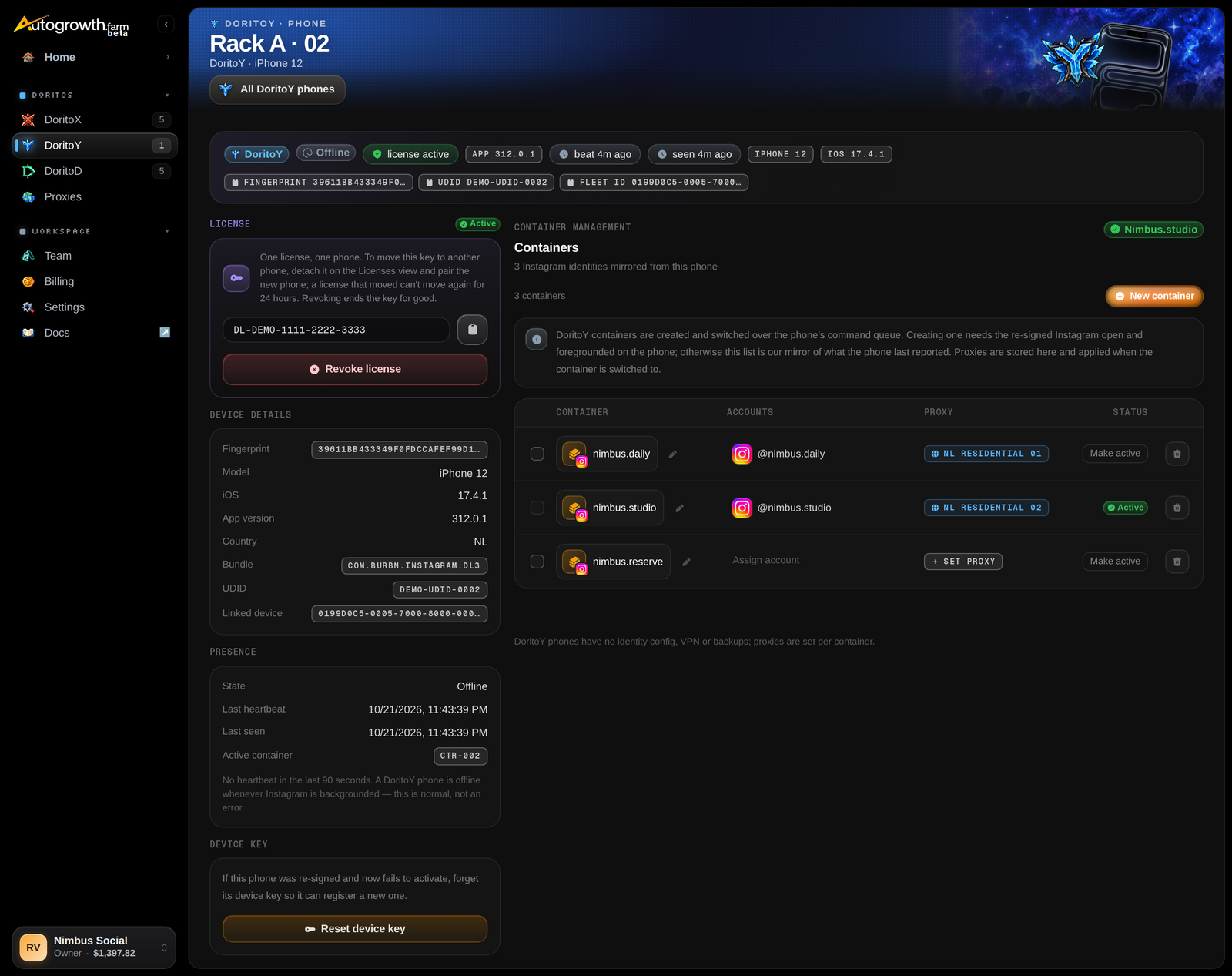
DoritoY gives a regular, non-jailbroken iPhone many Instagram identities. Each container is a separate Instagram identity with its own login and its own proxy. You switch between them from the dashboard, and an automation switches to the right one before every run.
It's the easiest way to run several Instagram accounts per phone. There's no jailbreak, so a phone that restarts just comes back.
What you get
- Unlimited Instagram containers. Make as many as you need on each phone. You pay per phone, never per container.
- A proxy per container. Set a proxy on each container, and it's applied when a run switches to it. This needs a DoritoY app update that adds proxy support; until then a run into a container with a proxy stops and says so.
- One account per container. Tie each Instagram account to its own container, and every run lands in the right one.
- Managed from the dashboard. Create, rename, switch and assign containers from your browser.
- Signing included. DoritoY is a special build of Instagram, installed on the phone and signed for you. Certificate renewals and replacements are free; they're applied the next time the phone is on the Companion.
Threads support is coming soon.
With or without a computer
A DoritoY phone works on its own. Once it's paired, it checks in with AutoGrowth over its own internet connection, and you manage its containers from the dashboard.
You do need the Companion once, to put the DoritoY app on the phone. Keep the phone plugged in and add Phone Control and Automations, and it can also be controlled live and run automations.
What you need
- A regular iPhone on iOS 16.3 or newer, with Developer Mode turned on.
- The Companion on a Mac or Windows PC, to install the DoritoY app.
- A DoritoY license for each phone. One license covers one phone and all its containers.
How it's billed
DoritoY is $400 per phone, per month at standard prices, with signing included. One license is enough to get started, and on its own it opens the Doritos and Farm sections of the dashboard. You only add Phone Control on the phones you also want to control live or automate. See Pricing.
Good to know
- The phone only listens while Instagram is open. DoritoY checks in about every 20 seconds while Instagram is on screen. When Instagram is in the background, the phone shows as offline. That's normal, and it picks up your changes the next time Instagram opens.
- Instagram only, for now. For other apps, or a full device identity per container, use DoritoX on a jailbroken iPhone. For Android phones, see DoritoD.
- One license, one phone at a time. You can move a license to another phone, but not more than once every 24 hours.
Set it up

Sign in to read the full docs
The setup guides, playbooks, reference and API docs are only open to paying customers.